

Join the Excel conversation on Slack
Ask a question or join the conversation for all things Excel on our Slack channel.
Ready for this month’s Excel challenge? You’ll be stepping into the shoes of an HR professional tasked with building an employee vacation tracker in Excel.
Here’s how it works:
- Watch the challenge video for a complete overview of the scenario.
- Review the instructions below to understand the tasks and guidelines.
- Download the Excel worksheet and share your solution.
- Watch our solution to compare.
Download the file here
Get the practice exercise to solve this challenge.
The challenge 🧗
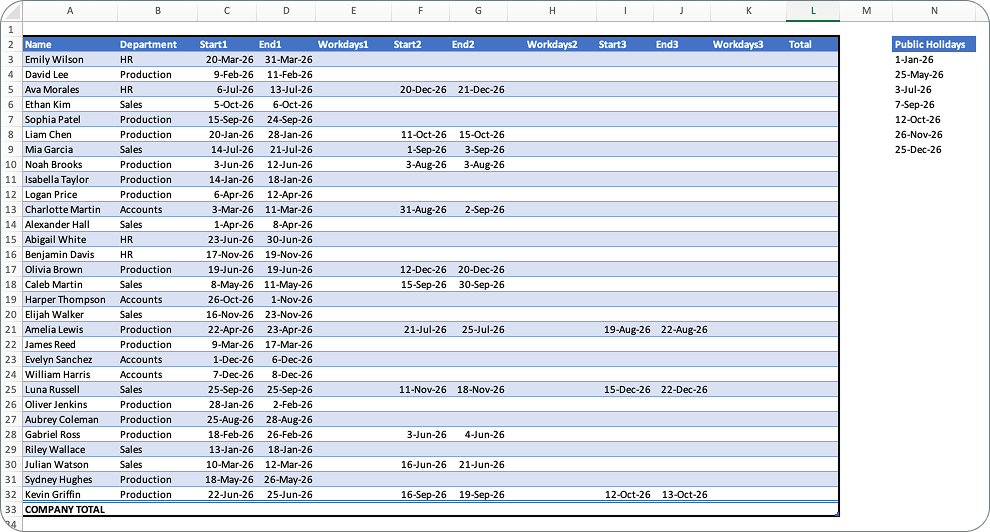
Imagine you work with the HR team at your company, and it’s the end of Q1. Many of the 30 employees have already started submitting vacation requests for the year, and your boss needs you to do a quick audit.
Before you dive in, here are a few company guidelines to keep in mind:
- All employees are entitled to 10 vacation days. Employees can take them all at once or split them up however they like.
- Saturday is the only weekend day at this company. If someone needs Sunday off, they’ll need to use a vacation day.
- There are 7 public holidays that everyone gets off, listed in Column N of the worksheet.
Your tasks 📝
Your job is to build a functional employee vacation tracker in Excel by completing these five tasks:
- Sort employees alphabetically by last name. The names are currently in “First Last” format, so you’ll need to reformat them before sorting.
- Calculate the number of working days each employee has requested off. Remember to account for the company’s unique weekend rules and the public holidays.
- Calculate the percentage of allowed vacation days selected across the entire company. Your boss also wants to see some kind of visual — use your imagination here!
- Identify which employees have overselected or underselected vacation days. In other words, who has requested too much time off, and who still has days to spare?
- Protect the worksheet so that your formulas can’t be accidentally deleted or changed when you send the file to your boss.
The hints 🕵
Not sure where to start? Here’s a nudge.
This company doesn’t follow a standard Monday–Friday schedule, which means a basic NETWORKDAYS formula won’t be enough. You’ll need a version of that function that lets you define which days count as the weekend.
Check out this GoSkills guide to Excel date functions to point you in the right direction!
Download the file here
Get the practice exercise to solve this challenge.
The solution ✅
Did you crack the code? Now it’s time to see how your solution stacks up! Watch how we approached this challenge.
Excel is all about creativity and flexibility, and there’s always more than one way to solve a problem. Share your solution — or even a new challenge idea — with our community on Slack and connect with fellow enthusiasts.
Need more Excel practice online? 🤩
If you enjoyed this challenge, keep the momentum going by exploring the rest of our Excel challenges or diving into the Resource Hub, packed with tutorials, tips, and tricks to boost your skills. For targeted learning, check out our Excel courses to master specific tools and techniques.
Keep crunching those numbers — we’ll see you in the next challenge! 👋
Level up your Excel skills
Become a certified Excel ninja with GoSkills bite-sized courses
Start free trial
Join the Excel conversation on Slack
Ask a question or join the conversation for all things Excel on our Slack channel.